 BitacoraBit
🌐 ES · EN · FR · IT · DE · PT · RU
Chapter 07
Statistics and costs
Chapter video
🎬 Video coming soon: we are filming it on board.
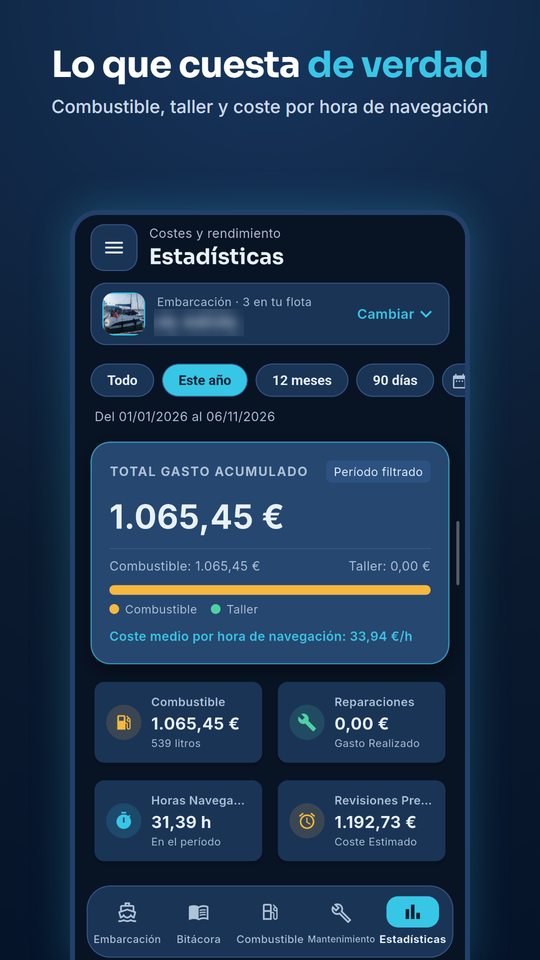
Period: choose All, This year, 12 months, 90 days or "Dates…" for a custom range.
Total spent: fuel and boatyard total, with a bar showing the split between them and the average cost per hour under way.
Boatyard costs per engine: on boats with several engines, how much was spent on each in the period (based on how invoice lines were split).
Spare parts analysis: see the historical spend by your items, by part number or by boatyard, with the date and engine hours of each invoice. With several engines you can filter by engine. When you choose one of your items you see, below the total, what was spent on each reference and at each boatyard (e.g. "NGK-ITR4A15 · Chandlery A: €45.00").
Pattern for each item: in Analysis, when you choose one of your items, BitacoraBit sorts your invoices for that item by date and measures, from each invoice to the next, the time and engine hours that passed (the difference between the hour meter readings recorded on each). From those intervals it tells you how often you replace it; if there are several, it takes the middle value so an odd interval doesn't skew it.
For the calculation to work:
- Record the hour meter on every invoice. If one of the two doesn't have it, that interval only counts time.
- Log every change, including the ones you do yourself (an invoice without a boatyard, which counts as Owner). If one is missing, the interval joins two changes and comes out much longer than reality.
- With only two invoices there is a single interval: the result is what happened between them, not a habit. With three or more it is more reliable.
- Lines on the same invoice, or on invoices less than 14 days apart, count as a single change.
You will also see its price per unit (usual, minimum and maximum) and the cheapest boatyard. If the interval in hours is known, the "Maintenance reminder every … h" button creates it counting from the last change, or adjusts the one you already have. Check the number before accepting: if it seems too long, an invoice is probably missing.
Check before saving: when you save an invoice, the app compares it with the boat's previous invoices. It warns you if an item costs more than 30 % above the usual unit price (with at least two invoices to compare), or if it is replaced before half its service life or usual interval, in case it's a recurring fault, warranty work or an overcharge. You can go back to the invoice or save it anyway.
PDF report: export a document with all the costs for the period for the boat's accounts.
← PreviousManual contentsNext →
📄 Download the manual as PDF (to print)
Try BitacoraBit free for 30 days
Have a question that is not here? Write to us at info@bitacorabit.com