 BitacoraBit
🌐 ES · EN · FR · IT · DE · PT · RU
Chapter 08
SOS and emergencies
Chapter video
🎬 Video coming soon: we are filming it on board.
SOS button: the red button at the top right, on every tab and on the nautical chart. It always works, even if your subscription has expired. Also without an account: on the sign-in screen.
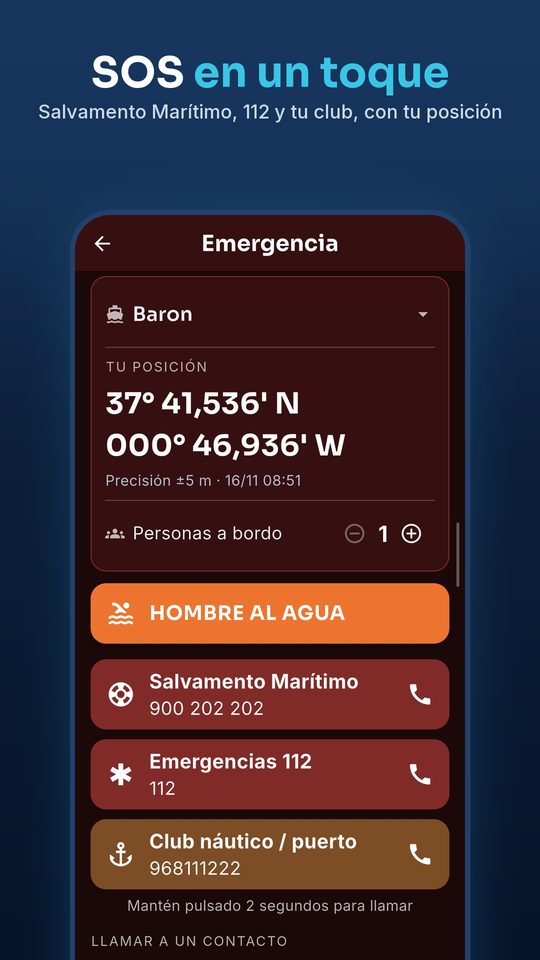
Your position: large and in nautical format (degrees and minutes), ready to read out on the radio, with its accuracy and time. Choose the boat at the top if you have several; the one you're using is shown.
Calls: press and hold for 2 seconds the button for Spanish Maritime Rescue (900 202 202), 112 or your marina. A short tap doesn't call, to avoid mistakes. On Android it calls directly (asks for permission the first time); 112 always goes through the dialler. On iPhone the phone asks you to confirm.
Marina phone: in each boat's record > Edit > Emergencies (each boat may be in a different marina).
Emergency contacts: menu (☰) > Emergency contacts. Up to 5, shared by all your boats: the marina's mobile, family… On the SOS screen you call them with one tap.
Send my position: prepares a message with the boat, position, map link, course, speed, time and persons on board. Choose SMS to all your contacts (works without data), WhatsApp straight to each contact's chat, or WhatsApp choosing the chat. You just press send.
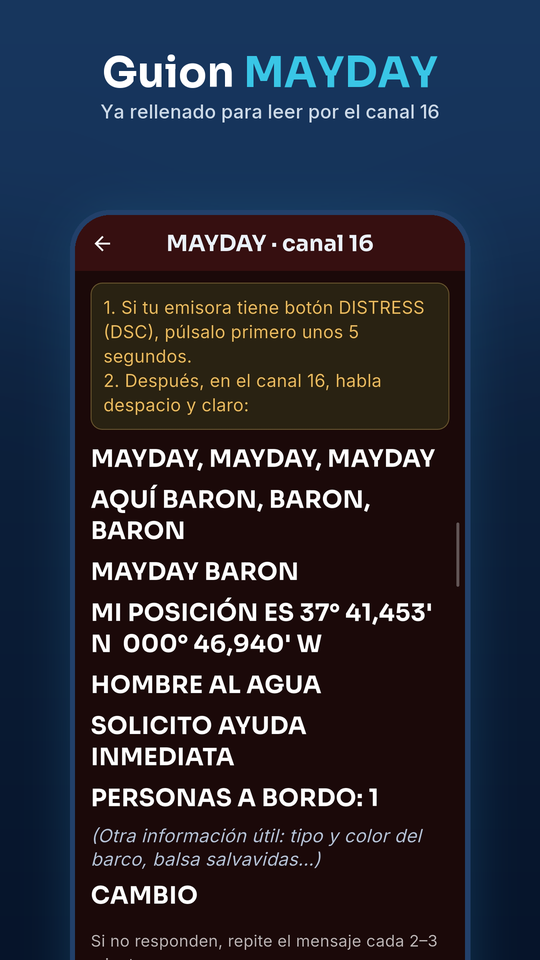
MAYDAY script: to read on VHF channel 16, already filled in with the boat's name, MMSI (from the record > Electronics), position and persons on board. If your radio has a DISTRESS (DSC) button, press it first.
People on board: counted automatically: the skipper, plus the crew linked by QR, plus people “without a linked phone”, which you add with + and − (for example, a child). When you press “Start passage” the app asks you to confirm. The number goes into the SOS message and the MAYDAY script. When the trip ends, people without a phone go back to 0.
Drill mode: turn it on at the top to practise. It doesn't call or send anything: it tells you what it would do.
Important: at sea, use your VHF first (channel 16 / DSC). This feature helps but doesn't replace your radio or EPIRB. Far from the coast there may be no mobile signal.
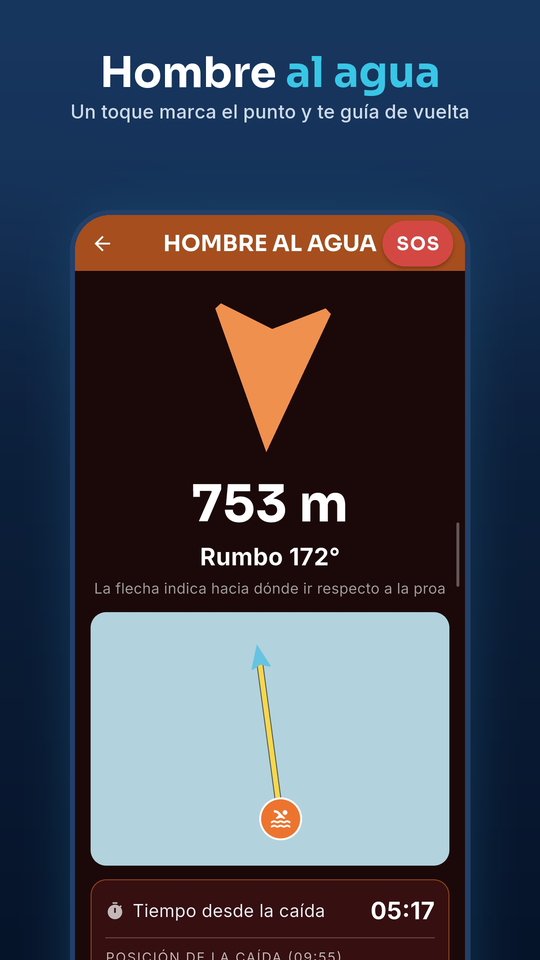
Man overboard: press the orange button (on the SOS screen and on the chart) ONCE. It vibrates, saves the position and time of the fall and opens the return screen: arrow showing where to go relative to the bow, distance, bearing, time since the fall, position for the radio and a map with your boat, the point and a yellow line. Near the point it says "You're at the point". From there you can call (SOS) or read the MAYDAY already filled in with "man overboard". "Person recovered" closes it and notes it in the trip; "Pressed by mistake" deletes it. It stays active even if the app is closed.
Crew (with a subscription and during the trial): anyone on board can raise a man overboard alarm from their own phone, without installing anything. On the chart, tap the crew icon and show the QR code BEFORE casting off. Each crew member scans it, types their name and keeps a page open with a big red button. Monitoring starts when you press “Start passage” and everything closes when you finish it. Each trip has a new QR code.
Raising the alarm: the crew member holds the red button for 1 second. Your phone sounds the alarm even if it is silent or locked, turns the screen on in flashing red with their name and the time, and the spot is marked on the chart. “Silence” only stops the siren; “GO TO THE SPOT” opens the return to the spot. If you leave the alarm, the red bar on the chart stays there.
Automatic monitoring: if the crew member keeps their screen on, their page sends a signal every 5 seconds. If it stops arriving (for example, when falling into the water), a pre-alert sounds first and then the full alarm: with the boat stopped or slow, after 30 and 60 seconds; under way (over 3 knots), after 15 and 25 seconds. Under way, it also goes off if they end up more than 50 m from you. If they lock the screen, their monitoring is “paused” and you see it in the list.
No false alarms: if your phone loses data, or everyone goes silent at once, it is not a fall but a coverage problem: an amber “No coverage” notice appears, and another when it returns. The pre-alert has an “On board” button to dismiss it if you can see them (for example, they went below). With the “Rough sea” switch (crew screen) the short times are always used: heavy weather, children on deck…
On the crew member’s phone: they see “✓ The skipper has received your alarm” when your alarm sounds, and “The skipper is heading to the spot” when you press GO TO THE SPOT. Their screen keeps flashing red, which works as a light at night. To clear it they hold for 1 second “Cancel alarm” (I am fine / false alarm: your alarm turns green, “ALARM CANCELLED”; check visually and close it, or go to the spot if you cannot see them) or “Hide this screen” (the alarm stays active).
Important: Crew needs mobile data on the phones. It is an extra safety aid: it does not replace the life jacket, EPIRB/PLB, AIS MOB or a call on channel 16.
Nearest rescue centre: below the Spanish coastguard button you will see which rescue coordination centre is nearest (for example, CCS Cartagena) and how far away it is. It is for information only: in an emergency always call 900 202 202, which works 24 hours a day and puts you through to the right centre.
Related guides
- Man overboard: what to do if someone falls off a boat
- How to call for help at sea: channel 16, DSC and MAYDAY step by step
← PreviousManual contentsWhat’s new →
📄 Download the manual as PDF (to print)
Try BitacoraBit free for 30 days
Have a question that is not here? Write to us at info@bitacorabit.com