 BitacoraBit
🌐 ES · EN · FR · IT · DE · PT · RU
Chapter 03
Live boat (NMEA 2000 sensors)
Chapter video
🎬 Video coming soon: we are filming it on board.
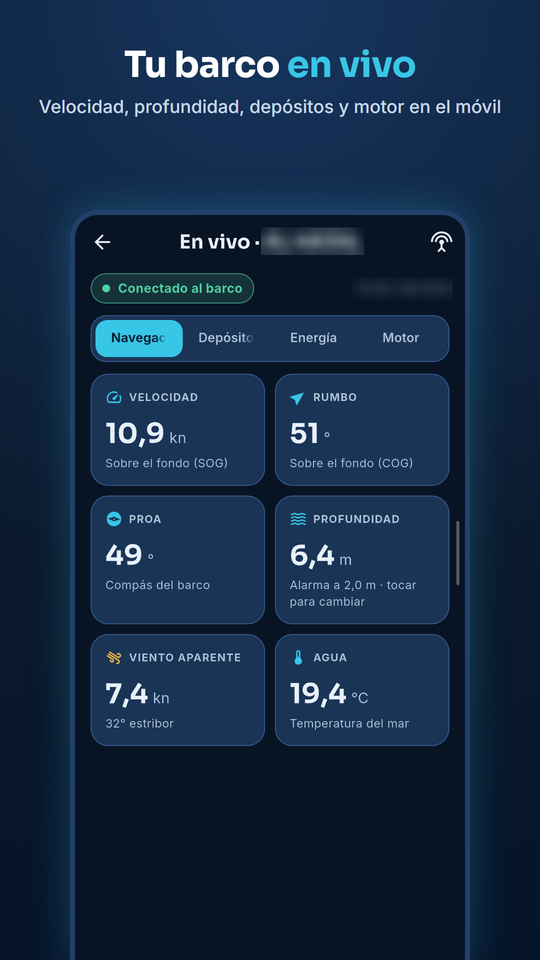
What it's for: see your boat's sensor data on your phone: navigation, tanks (fuel, fresh water, grey and black water), batteries, solar panels and engine (RPM, hours, temperature, oil pressure and fuel flow).
What you need on board: an NMEA 2000 network with a Wi-Fi gateway running a Signal K server (for example a commercial gateway or a Raspberry Pi with Signal K). The phone must be connected to the boat's Wi-Fi.
How to open it: "Live" button on the boat card, or side menu › Live boat.
Connect: tap the status badge (or the antenna icon) › "Search the boat's Wi-Fi". If it isn't found, enter the server's IP address (usually port 3000) and tap Connect. With "Connect automatically" on, the app connects by itself when you open the chart or Live boat and reconnects if the Wi-Fi drops.
If the server is secured (the usual case): the badge says "Access not approved yet". Open the Signal K dashboard in a browser (http://server-IP:3000), log in as administrator, go to Security › Access Requests and approve "BitacoraBit" with read-only permission. You only need to do it once: the app keeps the permission.
Connection status: green "Connected to boat", amber "Reconnecting…" or "Searching…", grey "Not connected".
Depth alarm: 2 m by default. Set it to your draught by tapping the Depth box in the Navigation tab (an outboard is not the same as an inboard or a sailboat). It is saved for each boat and also used by the chart.
Tanks: fuel and water turn amber below 25 % and red below 10 %; grey and black water the other way round (amber from 75 %, red from 90 %).
If a tab says "No data", your boat is not sending that information (those sensors are missing from the network).
← PreviousManual contentsNext →
📄 Download the manual as PDF (to print)
Try BitacoraBit free for 30 days
Have a question that is not here? Write to us at info@bitacorabit.com